There are few things you need to consider before overclocking your NVIDIA chipset videocard.Things to consider:
>> If your videocard still with warranty...do not overclock it. Overclocking and upgrading the heatsink will void its warranty.
>> Make sure you videocard is an Nvidia chipset.
>> Second is your heatsink, you need to keep in mind that overclocking will definitely increase your videocard's temperature. So you need to upgrade your videocard's stock heatsink. I prefer using large copper-type heatsink or if you're rich enough, buy a liquid-cooling system. Those 2 can dissipate heat faster compared to stock :D
(We will be upgrading the heatsink on STEP 10)>> Check and take note your videocards average temperature for 1-hr usage
before replacing your videocard's stock heatsink and overclocking. You can download the NVIDIA overclocking/monitoring tools
HERE. Install it then go to START MENU > ALL PROGRAMS > NVIDIA CORP > NVIDIA SYSTEM MONITOR to see the average temperature.
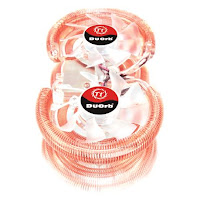
Copper-type heatsink
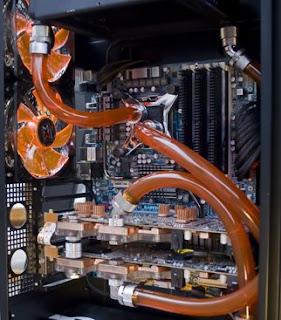
Liquid-cooling
 Proceed with OVERCLOCKING steps below once you meet the requirements above...1.
 Install the NVIDIA overclocking and monitoring tools
2. Take note of the average temperature of your videocard
before replacing your videocard's stock heatsink and overclocking like i mentioned above...lets assume that your average temp is 35-degrees celcius for 1-hr usage
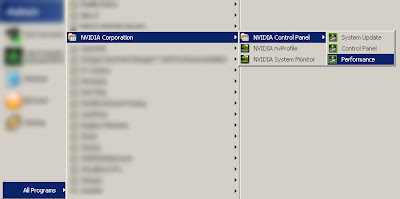
3. Now go to START MENU > ALL PROGRAMS > NVIDIA CORP > NVIDIA CONTROL PANEL > PERFORMANCE
 OPTIONAL PERFORMANCE TWEAK: Select the "adjust image settings with preview" tab on the left. Below the preview, select "USE MY PREFERENCE EMPHASIZING:" then drag the arrow below it leaning towards the PERFORMANCE side. You can skip this step if you want your card's settings to be BALANCE (by default) between performance and quality
4. Select the "PERFORMANCE" tab on the left then choose "DEVICE SETTINGS" below it
5. On the right, select the "CUSTOM" then take note the default value of CORE CLOCK and MEMORY CLOCK...lets assume that default values are CORE CLOCK: 400 and MEMORY CLOCK: 333, like whats on the picture below
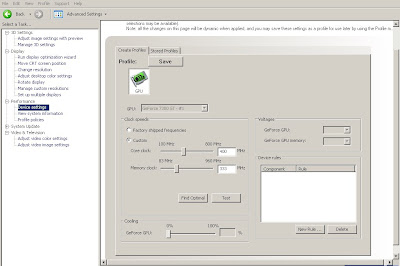 6.
6. Now press the "FIND OPTIMAL" button, this tool will find/suggest the optimal overclock for CORE and MEMORY...lets assume that the suggested are CORE CLOCK: 632 | MEMORY CLOCK: 425
7. Click the "TEST" button so the system can check the suggested settings...if test are successful, click the "APPLY" button on the lower part of the window.
8. Go to START MENU > ALL PROGRAMS > NVIDIA CORP > NVIDIA SYSTEM MONITOR again to check the difference on the temperature...lets assume that you now got 41-degrees celcius (after overclocking), thats 6-degrees higher compared to the average temp: 35-degrees celcius (before overclocking)
9. All the values we got are...
DEFAULT VALUES with STOCK HEATSINK
CORE CLOCK: 400 mhz
MEMORY CLOCK: 333 mhz
with 35-degrees celcius for 1-hr usage
SUGGESTED/OPTIMAL OVERCLOCK VALUES with STOCK HEATSINK
CORE CLOCK: 632 mhz
MEMORY CLOCK: 425 mhzwith 41-degrees celcius
10. To address the increase in temperature, turn-off your PC.
Now upgrade/replace the stock heatsink with the new one, make sure you clean the chipset surface before applying the thermal paste that came with the new heatsink.
11. After upgrading/replacing your heatsink,
take note your videocards average temperature again for 1-hr usage using SUGGESTED/OPTIMAL OVERCLOCK VALUES (CORE CLOCK: 632 | MEMORY CLOCK: 425) ...lets say that the temperature now decreases to 34-degrees celcius
SUGGESTED/OPTIMAL OVERCLOCK VALUES with NEW HEATSINK
CORE CLOCK: 632 mhz
MEMORY CLOCK: 425 mhzwith 34-degrees celcius
12. Your videocard is now overclocked while maintaining the default temperature 34-35 degrees celcius
using the new heatsink.
13. Try testing the new videocard settings on any 3D games. My suggestion is
Call of duty 4 since you can
display the FPS on it for easy referrence ;-) ...but any 3D games will do.
"All the CLOCKS used here are the values I got when I overclocked my own videocard before"


